Submitted by greggles on
Here's a handy little "cheat sheet" that tells you what all the SVN status codes mean. I was tired of doing
svn status
? files/small.txt
? files/small_0.txt
M boards/phorum/cache
M boards/phorum/include/db/config.php
man svn
So I made this simple little sheet. Print it out. Stick it on the wall. In a month, you know the codes and throw it away (or better yet, give it to your friend who is learning SVN).
SVN Status Simple Cheat Sheet
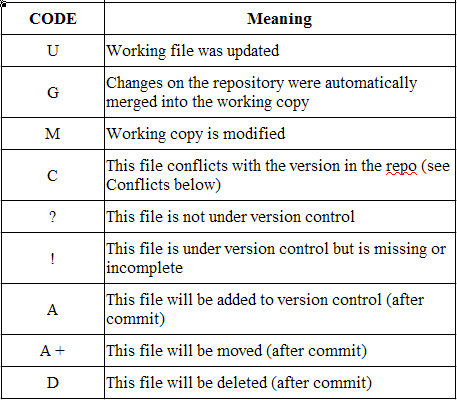
Full Blown SVN Cheat Sheet
If you want the real-deal full blown Subversion cheat-sheet then there's this handy refcard that should cover most of your needs - but it's two pages and has all sorts of other stuff I don't care about. Hence my small status code cheat sheet :)
Category:
People Involved:
timeline:
- Log in to post comments
Comments
SVN Quick Refer... replied on Permalink
Pingback
Anonymous replied on Permalink
Uh, where is your simple cheat sheet???
Where is your simple cheat sheet??? All I see are big giant "SVN Status Simple Cheat Sheet" and "Full Blown SVN Cheat Sheet" headings but no links except to the "refcard" that has no info about SVN status's output.
sorry about that
An upgrade had caused the image to no longer be displayed which made it harder to find the download link etc.
It should be there now.
Anonymous replied on Permalink
your cheat sheet misses "I"
your cheat sheet misses "I" which shows ignored files when svn status --no-ignore is used
Ahsas Shahzad replied on Permalink
you missed "L" status
check it again and update,
seems quite helping article and didn't helped me as i was searching for "L" status
Thanks
Ahsas Shahzad replied on Permalink
it means, directory is
it means, directory is 'Locked'
Lilit Yenokyan replied on Permalink
More coherent SVN status versions
Hi folks,
Follow this link for more SVN status messages.
http://www.informatik.hs-mannheim.de/subversion/svn.ref.svn.c.status.html
'I' - Item is being ignored (e.g. with the svn:ignore property).
'L' - Item is locked.
'D'- Item is scheduled for Deletion. etc...
Morpha replied on Permalink
L - is for item is locked. To
L - is for item is locked.
To clear that up u need to use the clean up command. " svn cleanup ".
cleanup - it searches your working copy and runs any leftover logs, removing working copy locks in the process.
Mehmet Karatay replied on Permalink
Thank you
Even if this is missing a few thing, I sill find this very useful. Thank you for putting it together.
Joe Wein replied on Permalink
~ - is for messed up item
A tilda (~) can appear next to an item if either the type doesn't match (e.g. it should be a directory but it's a file) or part or all of the .svn subtree in a directory is missing. The quickest solution usually is to rename the item out of the way and then do an "svn up" on the enclosing directory to restore the item from the repository.
Anonymous replied on Permalink
What about 'R'?
I always get 'R' after merging in the leftmost column. What the heck does that mean?
Anonymous replied on Permalink
What does X mean? External?
What does X mean? External?
Joe Wein replied on Permalink
X means unversioned but used by an externals definition
According to the output of "svn help stat":
'X' item is unversioned, but is used by an externals definition
Sofoklis replied on Permalink
What does the status "E" mean?
I saw a file was updated with the status "E", does anyone know what this is?
I would've expected a "G" since it was merged up from a previous branch. Any ideas?
Anonymous replied on Permalink
i got status "E" when running
i got status "E" when running a checkout w/ the --force option. it stands for "exists" and was implemented after v1.5: http://old.nabble.com/Output-of-svn-co---what-does-E-mean--td20916241.html
fritz from london replied on Permalink
What about the R, L etc
Output of svn status is in six columns - the table above only tells you about the first letter.
If you want to know them all, you need to run the man svn command, or look it up on the web - for example here
http://blog.gotofritz.net/geekery/unix/svn-status-codes/
SVN Status code... replied on Permalink
Pingback
zhuzhu replied on Permalink
Presentation
Hello,
Nice to be registered on knaddison.com. My little name is maxizhu ;-)
Donny Nyamweya replied on Permalink
Status codes vs switches
I was actually expecting info on the various switches available when requesting the status (that is -u -q -v etc). Here is additional information about results status codes - http://svnbook.red-bean.com/nightly/en/svn.ref.svn.c.status.html